• Some users have recently had their accounts hijacked. It seems that the now defunct EVGA forums might have compromised your password there and seems many are using the same PW here. We would suggest you UPDATE YOUR PASSWORD and TURN ON 2FA for your account here to further secure it. None of the compromised accounts had 2FA turned on.
    Once you have enabled 2FA, your account will be updated soon to show a badge, letting other members know that you use 2FA to protect your account. This should be beneficial for everyone that uses FSFT.

CPU speed?

TangledThornz

[H]ard|Gawd
2FA
Joined
Jun 12, 2018
Messages
1,469
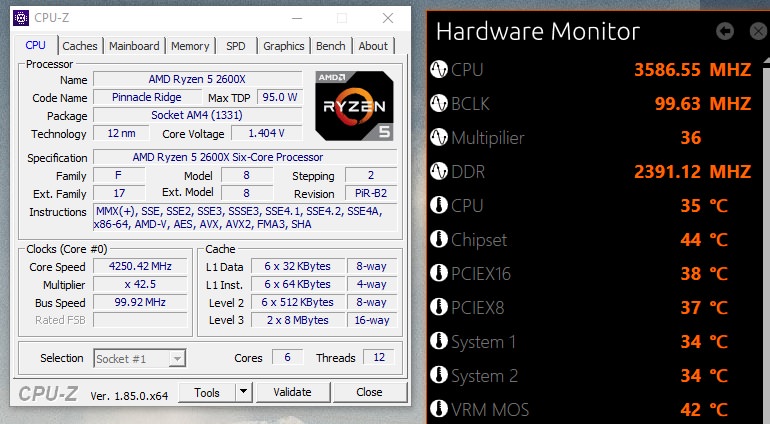
I just installed a 2600X and I'm trying to determine what is the actual speed I'm getting with it. In the below screenshot I have an output from CPU-Z and Gigabyte's hardware monitor. Is the CPU actually at 3.6 or hitting 4.2 GHz? I run the CPU-Z CPU stress test and its hitting at about 3665.

I installed a Cooler Master 240L RGB and I'm afraid I'm not getting the high speed I expected from the 2600X.

UEGvntW.jpg
 
So the speeds you are going to see with those programs do not tell the full story. The clocks at stock settings are using Precision Boost 2. We talk about how PB2 works on the 2700X here. Same story with 2600, but different clocks and numbers of cores.

If you go grab HWiNFO64, you can run that and it will show you the clock on each core and what its rate is currently under any particular load. Different loads equal different clocks. It is very dynamic.
 
Back
Top