• Some users have recently had their accounts hijacked. It seems that the now defunct EVGA forums might have compromised your password there and seems many are using the same PW here. We would suggest you UPDATE YOUR PASSWORD and TURN ON 2FA for your account here to further secure it. None of the compromised accounts had 2FA turned on.
    Once you have enabled 2FA, your account will be updated soon to show a badge, letting other members know that you use 2FA to protect your account. This should be beneficial for everyone that uses FSFT.

9800X3D Memory Overclocking

sk3tch

Supreme [H]ardness
2FA
Joined
Sep 5, 2008
Messages
4,509
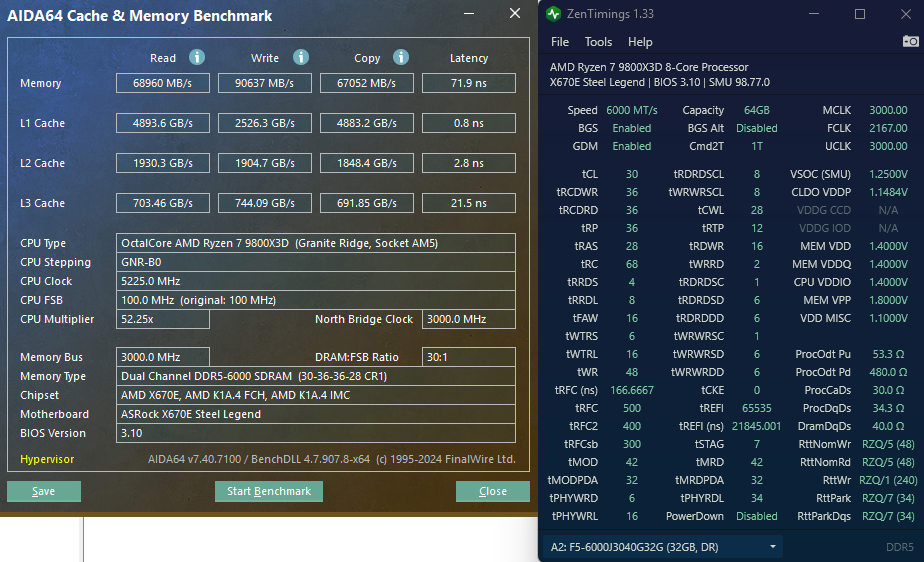
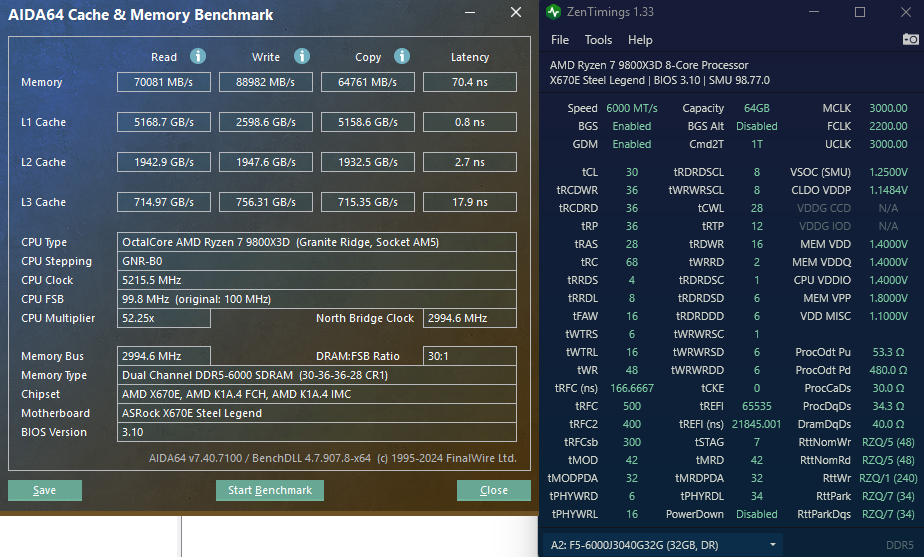
I've got a pretty cheap pair of 32GB DDR5 sticks and I've always used Buildzoid's easy tweaks to get some extra oompth. Someone posted on reddit with similar sticks to mine so I have been down the rabbit hole a bit of tweaking. Mind you - I am still 100% a memory OC noob...but I feel I am getting there a bit.

Been tweaking my SCLs from 4 to 8 and to 4 and then 8 back again - it gets me better copy speeds at the 8 number which is strange (Buildzoid recommends 4). Flipped VSOC from 1.20 to 1.25 - not sure if I needed that but dude I was trying to emulate on reddit had it and he has the 2167.00 FCLK like I have.

tFAW I just futzed with because someone recommended it...when I went back to 20 I saw a regression so back it went to 16. It has been stable. Just small OCCT runs for stability and of course running the AIDA64 cache & memory bench.

Any other tips? Having fun which is the most important thing. :)

Final result (so far):
9800x3d_64gb_buildzoid_tweaked4.png


Source:
Buildzoid - https://www.patreon.com/posts/low-effort-rank-77403831
Reddit thread - https://old.reddit.com/r/overclocki...3d_and_2x32gb_6000cl30363696_gskill_expo_kit/

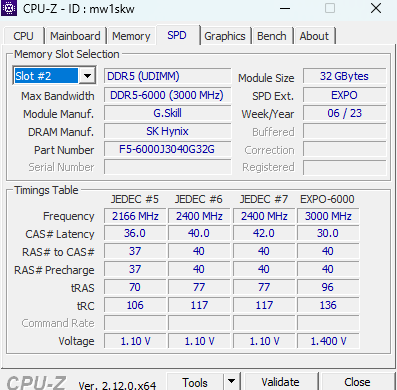
My RAM:
mem.png

G.Skill F5-6000J3040G32GX2-TZ5N​

G.Skill Trident Z5 Neo
DDR5-6000 CL30-40-40-96 1.40V
64GB (2x32GB)
AMD EXPO

https://www.gskill.com/product/165/393/1665020366/F5-6000J3040G32GX2-TZ5N

Full rig specs:
https://valid.x86.fr/mw1skw
 
I just use the old school method. Overclock speed first, stock CPU settings, stock timings. Run 3 Geekbench 6 CPU benchmarks, then 3 CPU-Z CPU benchmarks, and take note of scores. If the score is lower, or there are errors, then it's no good. Once you find a good score, stress test the memory.

Then, start with 1T vs 2T timings. Usually 1T is hit or miss, but it's worth a shot.

Then the rest of the timings. CAS 30 to 29, 28, 27, etc. Then RAS to CAS Delay 40 to 39, 38, 37, etc.

All the way on down with the rest of the timings.
 
I just use the old school method. Overclock speed first, stock CPU settings, stock timings. Run 3 Geekbench 6 CPU benchmarks, then 3 CPU-Z CPU benchmarks, and take note of scores. If the score is lower, or there are errors, then it's no good. Once you find a good score, stress test the memory.

Then, start with 1T vs 2T timings. Usually 1T is hit or miss, but it's worth a shot.

Then the rest of the timings. CAS 30 to 29, 28, 27, etc. Then RAS to CAS Delay 40 to 39, 38, 37, etc.

All the way on down with the rest of the timings.
You don't raise the voltage when trying to bring down the CAS timings? At some point I want to tighten my timings down to C30 from 32 just need the knowledge and time.
 
I've got a pretty cheap pair of 32GB DDR5 sticks and I've always used Buildzoid's easy tweaks to get some extra oompth. Someone posted on reddit with similar sticks to mine so I have been down the rabbit hole a bit of tweaking. Mind you - I am still 100% a memory OC noob...but I feel I am getting there a bit.

Been tweaking my SCLs from 4 to 8 and to 4 and then 8 back again - it gets me better copy speeds at the 8 number which is strange (Buildzoid recommends 4). Flipped VSOC from 1.20 to 1.25 - not sure if I needed that but dude I was trying to emulate on reddit had it and he has the 2167.00 FCLK like I have.

tFAW I just futzed with because someone recommended it...when I went back to 20 I saw a regression so back it went to 16. It has been stable. Just small OCCT runs for stability and of course running the AIDA64 cache & memory bench.

Any other tips? Having fun which is the most important thing. :)

Final result (so far):
View attachment 692254

Source:
Buildzoid - https://www.patreon.com/posts/low-effort-rank-77403831
Reddit thread - https://old.reddit.com/r/overclocki...3d_and_2x32gb_6000cl30363696_gskill_expo_kit/

My RAM:
View attachment 692257

G.Skill F5-6000J3040G32GX2-TZ5N​

G.Skill Trident Z5 Neo
DDR5-6000 CL30-40-40-96 1.40V
64GB (2x32GB)
AMD EXPO

https://www.gskill.com/product/165/393/1665020366/F5-6000J3040G32GX2-TZ5N

Full rig specs:
https://valid.x86.fr/mw1skw

Buildzoids vids are exhausting but valuable. I have trouble translating his long videos into practice. He just rambles endlessly which is good but hard to follow lol
 
You don't raise the voltage when trying to bring down the CAS timings? At some point I want to tighten my timings down to C30 from 32 just need the knowledge and time.
If I'm aiming at targeted timings, yes, but I was speaking in terms of how I generally test my memory overclocks. I test for score results first because it's quicker, then test for stability afterwards. Usually when you have a memory error, you'll know right away with the benchmarks. I used to do it the other way, but it just took way longer (like 15, 30, to an hour or longer for stress tests).

If trying to reach something specific, like memory timings, then I'd OC that first, than RAM speed overclocks last. I'd also use the recommended max memory voltage and see if it's stable with the timings you're looking for. Then adjust higher if you really want to get there, or adjust lower to see how efficient it is with the timings overclock you're satisfied with.
 
Buildzoids vids are exhausting but valuable. I have trouble translating his long videos into practice. He just rambles endlessly which is good but hard to follow lol
Precisely which is why I linked to his little post on the timings to use - makes it a lot more simple haha. He's pretty much my fav technical "personality" but I agree he does ramble a bit.

EDIT: another good thread on 9800X3D mem overclocking on reddit - https://old.reddit.com/r/overclocki...6000_cl30_9800x3d_thoughts_on_how_to_improve/

EDIT2: disabled hypervisor and upped FCLK to 2200 MHz...inching closer to 69ns! :)
9800x3d_64gb_buildzoid_tweaked5.png


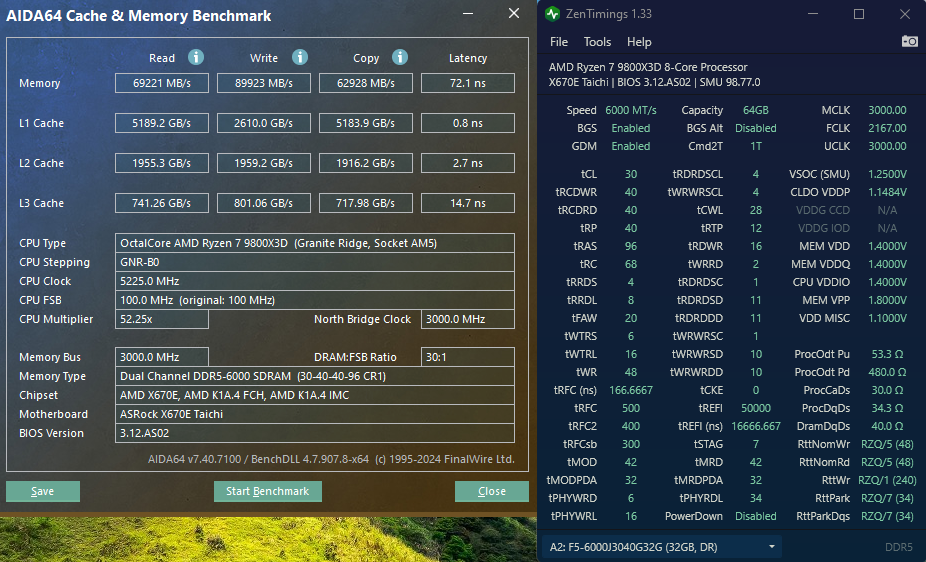
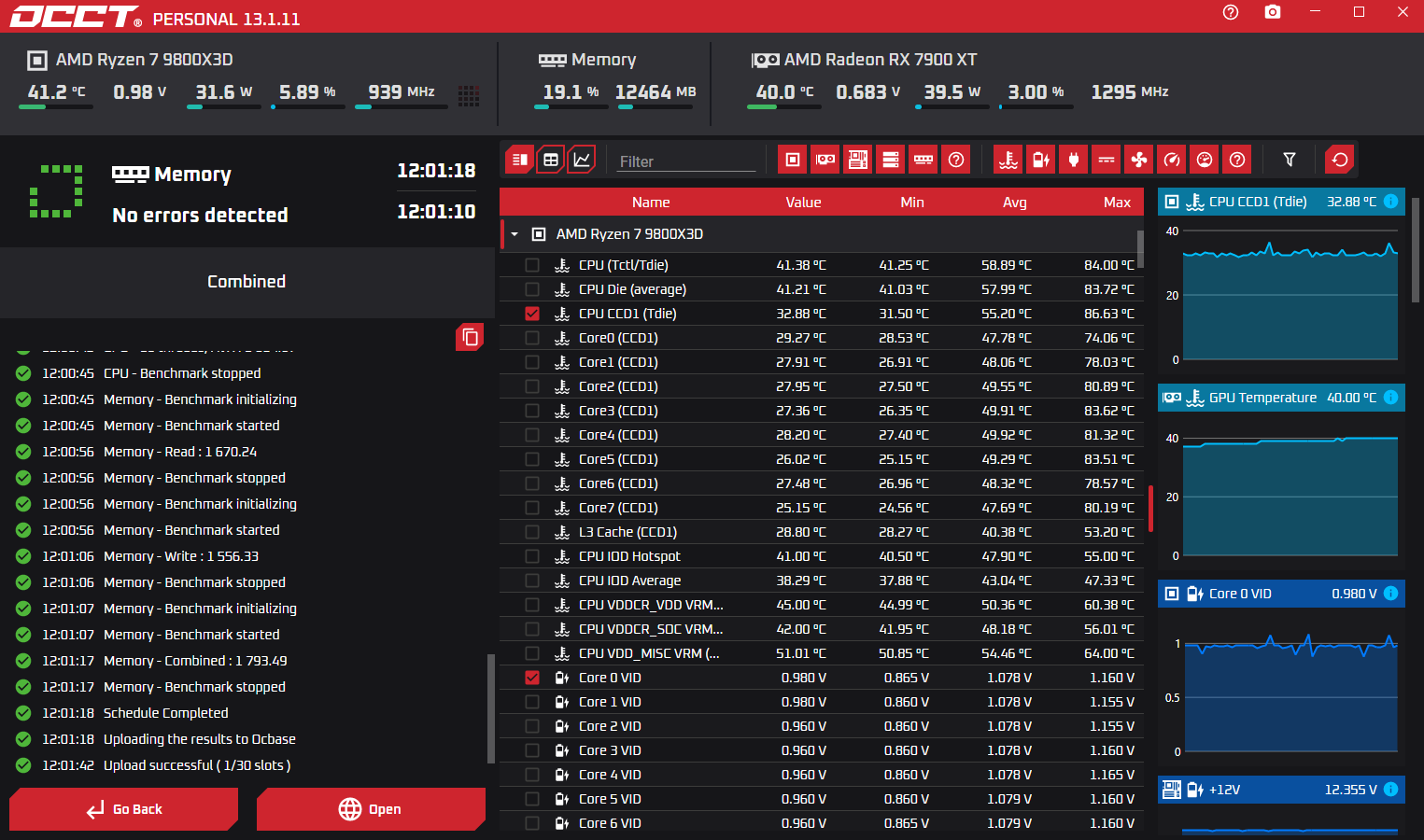
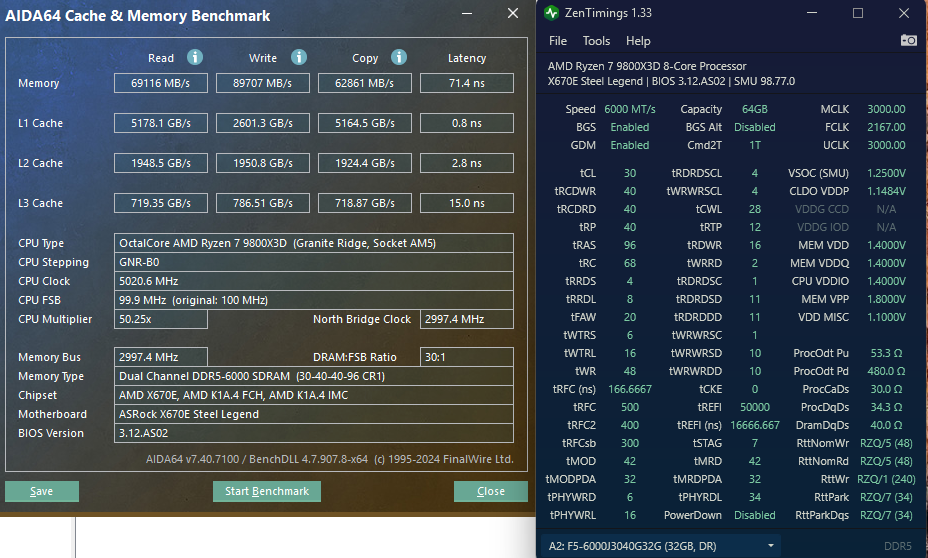
EDIT3: new BIOS, new tweaks. PBO neg 20...not as aggressive on mem, yet but this is OCCT stable after 12 hours:


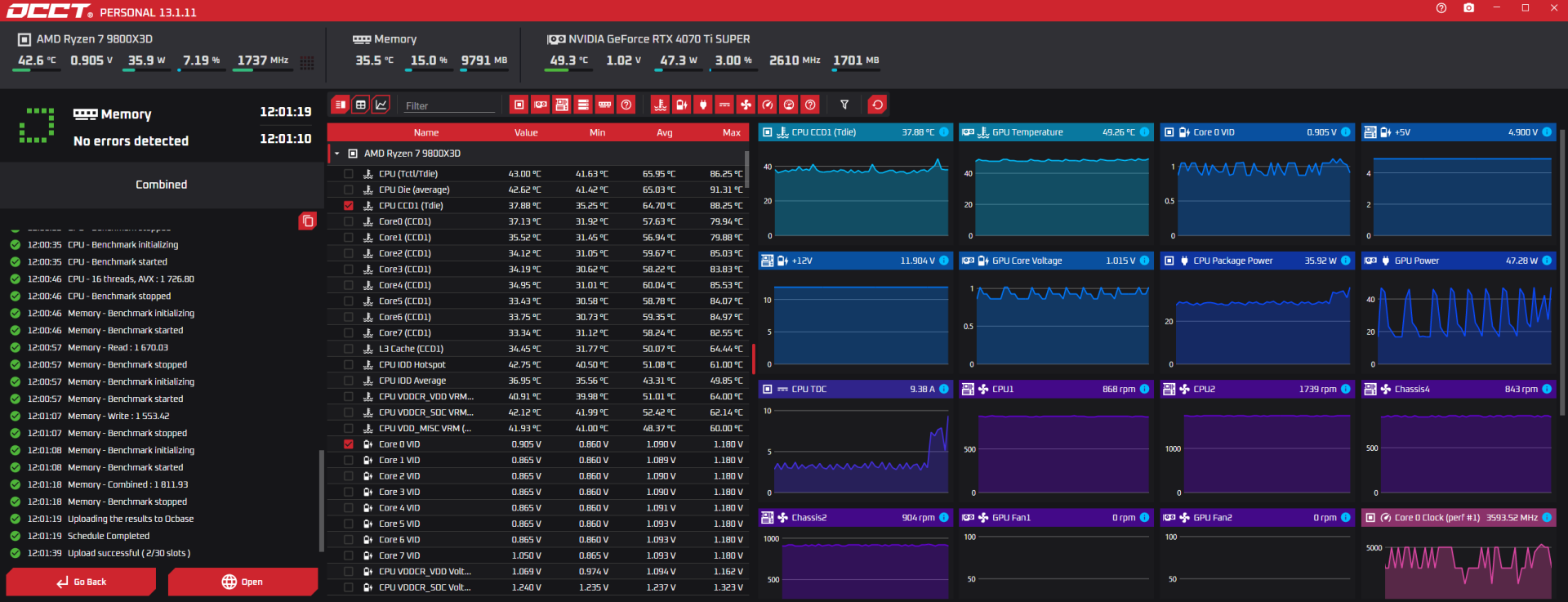
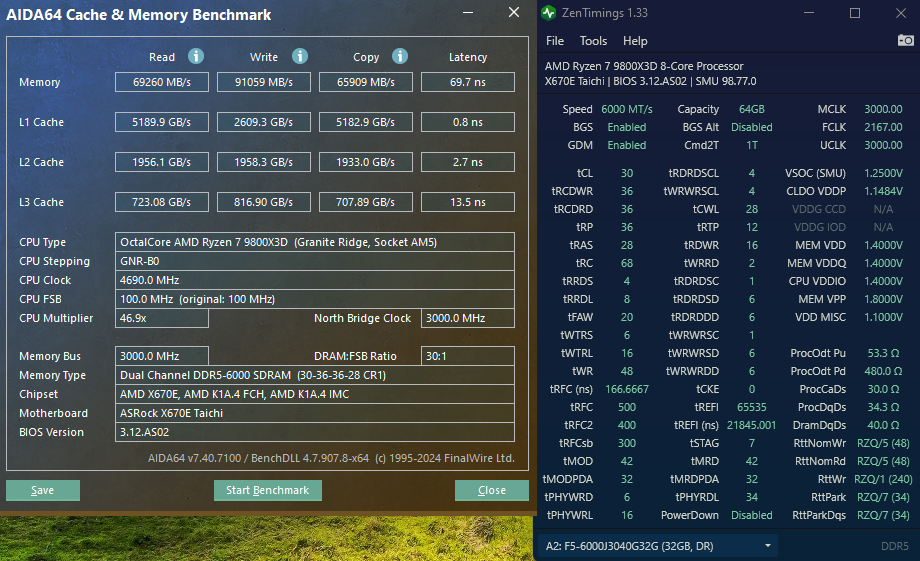
X670E Taichi / 9800X3D (first time tweaking this combo - my other rig was a Steel Legend - that one is still doing OCCT 12 hour right now):
taichi_buildzoid_pboneg20_occt12hrstable.png

OCCT-241122-064154.png

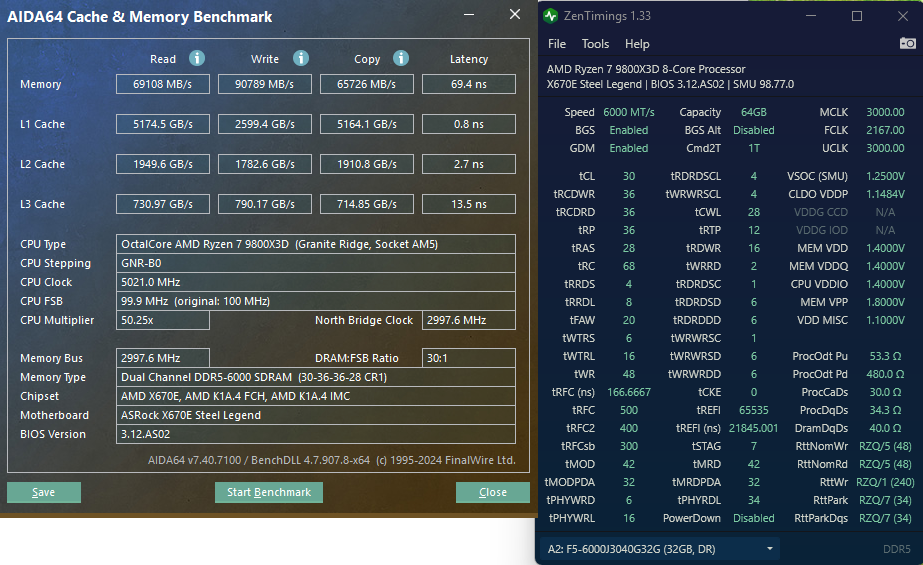
X670E Steel Legend / 9800X3D
steellegend_buildzoid_pboneg20_occt12hr.png

OCCT-241122-093319.png
 
Last edited:
Last edited:
You can try to check the stability with TM5.
If you get any error in the OCN must have error list, this will help you resolve it.
 
Yeah.
For TM5 there are a few different profiles that test different things.

Karhu is also very good, but not free.
Thanks! I was hoping Karhu was updated more recently - but it is from 2018 as well, lol.

How long do I run Karhu until it is considered stable?
 
I've got a pretty cheap pair of 32GB DDR5 sticks and I've always used Buildzoid's easy tweaks to get some extra oompth. Someone posted on reddit with similar sticks to mine so I have been down the rabbit hole a bit of tweaking. Mind you - I am still 100% a memory OC noob...but I feel I am getting there a bit.

Been tweaking my SCLs from 4 to 8 and to 4 and then 8 back again - it gets me better copy speeds at the 8 number which is strange (Buildzoid recommends 4). Flipped VSOC from 1.20 to 1.25 - not sure if I needed that but dude I was trying to emulate on reddit had it and he has the 2167.00 FCLK like I have.

tFAW I just futzed with because someone recommended it...when I went back to 20 I saw a regression so back it went to 16. It has been stable. Just small OCCT runs for stability and of course running the AIDA64 cache & memory bench.

Any other tips? Having fun which is the most important thing. :)

Final result (so far):
View attachment 692254

Source:
Buildzoid - https://www.patreon.com/posts/low-effort-rank-77403831
Reddit thread - https://old.reddit.com/r/overclocki...3d_and_2x32gb_6000cl30363696_gskill_expo_kit/

My RAM:
View attachment 692257

G.Skill F5-6000J3040G32GX2-TZ5N​

G.Skill Trident Z5 Neo
DDR5-6000 CL30-40-40-96 1.40V
64GB (2x32GB)
AMD EXPO

https://www.gskill.com/product/165/393/1665020366/F5-6000J3040G32GX2-TZ5N

Full rig specs:
https://valid.x86.fr/mw1skw
This is how I ran a 7800X3D

https://hardforum.com/threads/anyon...x3d-to-7800x3d.2027175/page-5#post-1045832961
 
Now I need to do OCCT, Karhu, and Prime95 large FFTs to validate stability, lol.
I do OCCT and Prime I'm to cheap to pay for Kharhu lol even tho it's been suggested it catches errors the fastest although sometimes will throw an error 12-24 hours later also. In my experience prime and OCCT catch errors rather quickly too.
My 13900KS is prime95/OCCT stable at 5.7/4.4 and that is good enough for me running 16 cores hyperthreading off now under 1.3v.
Thanks for posting your results, interesting.
 
I do OCCT and Prime I'm to cheap to pay for Kharhu lol even tho it's been suggested it catches errors the fastest although sometimes will throw an error 12-24 hours later also. In my experience prime and OCCT catch errors rather quickly too.
My 13900KS is prime95/OCCT stable at 5.7/4.4 and that is good enough for me running 16 cores hyperthreading off now under 1.3v.
Thanks for posting your results, interesting.
Passed about 6 hours of Karhu and about 3 hours of Prime95 large FFTs...calling it good!
 
Passed about 6 hours of Karhu and about 3 hours of Prime95 large FFTs...calling it good!
I can respect that good for you that's definitely more than stable.

I don't even go that far usually they'll throw an error in the first 5 to 10 minutes if it's unstable after that I'll run 30 minutes max and I don't care what anybody says if it can get it to like 30 minutes I know it's stable cuz it'll never crash into my games either and if it ever does crash I can go back so we reconfigure but once it's always a OCCT and 95 stable for about half an hour it'll never crash in a game that's just my experience and I feel like I'm just torturing my chip for no reason. Some people like to run it for 24 hours I don't want to be pushing the 80° for that extended period of time I feel like it's just going to hurt it for no reason but I can understand if you want that piece of mind.
 
I can respect that good for you that's definitely more than stable.

I don't even go that far usually they'll throw an error in the first 5 to 10 minutes if it's unstable after that I'll run 30 minutes max and I don't care what anybody says if it can get it to like 30 minutes I know it's stable cuz it'll never crash into my games either and if it ever does crash I can go back so we reconfigure but once it's always a OCCT and 95 stable for about half an hour it'll never crash in a game that's just my experience and I feel like I'm just torturing my chip for no reason. Some people like to run it for 24 hours I don't want to be pushing the 80° for that extended period of time I feel like it's just going to hurt it for no reason but I can understand if you want that piece of mind.
Oh yeah I am totally with you. I'm just lucky to work from home and have multiple rigs so I take advantage sometimes. I'm kind of in both camps. It is cool to get goals completed like OCCT certificates and stuff, but yeah crazy torture tests for hours and hours are not worthwhile. You will know and know fast...but where I go beyond that is I love playing Fortnite and nothing is worse than an in-game crash during my 30 minutes to play every day haha.
 
Oh yeah I am totally with you. I'm just lucky to work from home and have multiple rigs so I take advantage sometimes. I'm kind of in both camps. It is cool to get goals completed like OCCT certificates and stuff, but yeah crazy torture tests for hours and hours are not worthwhile. You will know and know fast...but where I go beyond that is I love playing Fortnite and nothing is worse than an in-game crash during my 30 minutes to play every day haha.
Yes sir same here playing competitive shooters are 300-600 fps you need stability you don't wanna crash and lose that sweet sweet MMR haha I'm actually interested to see how good Marvel Rivals is going to be I'm gonna try it when it releases.

Fair enough, life is about goals and achieving them, and having a stable PC is a MUST.

So what cooling is this being tested on?
 
Now I need to do OCCT, Karhu, and Prime95 large FFTs to validate stability, lol.
Usually 6-12 hours of Karhu is enough, some people do 24 hours. It does different cycles and some of them are for thermal errors that can occur under heavy load.
 
Not all DDR5 kits have a thermal sensor, and with Karhu, CPU temperatures should not be as high as with Primer95.
 
Yes sir same here playing competitive shooters are 300-600 fps you need stability you don't wanna crash and lose that sweet sweet MMR haha I'm actually interested to see how good Marvel Rivals is going to be I'm gonna try it when it releases.

Fair enough, life is about goals and achieving them, and having a stable PC is a MUST.

So what cooling is this being tested on?
Just an NZXT 280mm cooler with Thermal Grizzly Kryonaut.

What is your throttle temp limit set to? I'm at 88C and it's only using 86% of my fast power limit.

85 - should I raise it?

Not all DDR5 kits have a thermal sensor, and with Karhu, CPU temperatures should not be as high as with Primer95.

Good to know - thank you for the tip!
 
Well the reason I asked is because monitoring L3 temps long term and it's effect on the boost algorithm is a goal of mine as well as calculating the power temperature curves of said algorithm. Currently at 88C limit 5.485Ghz on all of the cores is peaking the L3 at near 70C with 86% fast power limit.(Power head to be exploited when temps are managed better) I will delid this cpu after I find max safe limits with the lid on giving me a near perfect baseline to further study the temperature/power curve effect of the boost algorithm to make a optimum daily driver profile.
 
Well the reason I asked is because monitoring L3 temps long term and it's effect on the boost algorithm is a goal of mine as well as calculating the power temperature curves of said algorithm. Currently at 88C limit 5.485Ghz on all of the cores is peaking the L3 at near 70C with 86% fast power limit.(Power head to be exploited when temps are managed better) I will delid this cpu after I find max safe limits with the lid on giving me a near perfect baseline to further study the temperature/power curve effect of the boost algorithm to make a optimum daily driver profile.
Oh wow. I have a lame ASRock pre-set of PBO negative 20 and the max 85 temp - so nothing exotic there. Happy to keep an eye on data points I use and watch HWiNFO religiously on all of my rigs.
 
Yea can't find anything on safe temp limit for L3 but extrapolating from the thermal limit imposed on the 7800X3D I think it's a safe assumption of around 80C for this cpus hot silicon roof. I don't wanna learn the hard way as no replacement is readily available ATM. At this point this is all academic since it will eventually become a naked die and depending upon the boost algorithm much of the data may become obsolete but it's entertaining me in the interim.
 
Yea can't find anything on safe temp limit for L3 but extrapolating from the thermal limit imposed on the 7800X3D I think it's a safe assumption of around 80C for this cpus hot silicon roof. I don't wanna learn the hard way as no replacement is readily available ATM. At this point this is all academic since it will eventually become a naked die and depending upon the boost algorithm much of the data may become obsolete but it's entertaining me in the interim.
So 85 as a max is a good idea then. I am frankly not that interested in a big OC on my 9800X3D…hence why I’m focusing on memory OC for now. Thanks and appreciate the insight into what you’re dinging around with! :) as long as we are having fun right? 😎
 
Just an NZXT 280mm cooler with Thermal Grizzly Kryonaut.


85 - should I raise it?


Good to know - thank you for the tip!
Personally I never let any of my CPUs go above 80° and tune the CPU for Max performance without it hitting 80. Of course it is whatever you are comfortable with it though even though it would be "fine" I just don't want any accelerated degradation. Same goes for my gpus 80° hard limit.
 
Personally I never let any of my CPUs go above 80° and tune the CPU for Max performance without it hitting 80. Of course it is whatever you are comfortable with it though even though it would be "fine" I just don't want any accelerated degradation. Same goes for my gpus 80° hard limit.
Yes the end goal here is 80C and under for the CCD when it's naked and L3 under 70C for use as a daily with clocks as high as possible within power limits.
 
Personally I never let any of my CPUs go above 80° and tune the CPU for Max performance without it hitting 80. Of course it is whatever you are comfortable with it though even though it would be "fine" I just don't want any accelerated degradation. Same goes for my gpus 80° hard limit.
Makes sense. My CPU never gets near 80 in normal use (gaming) - just benches and stress tests!
 
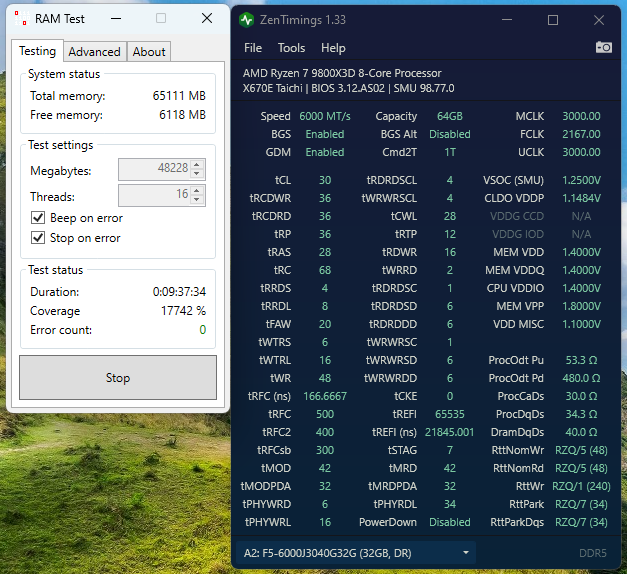
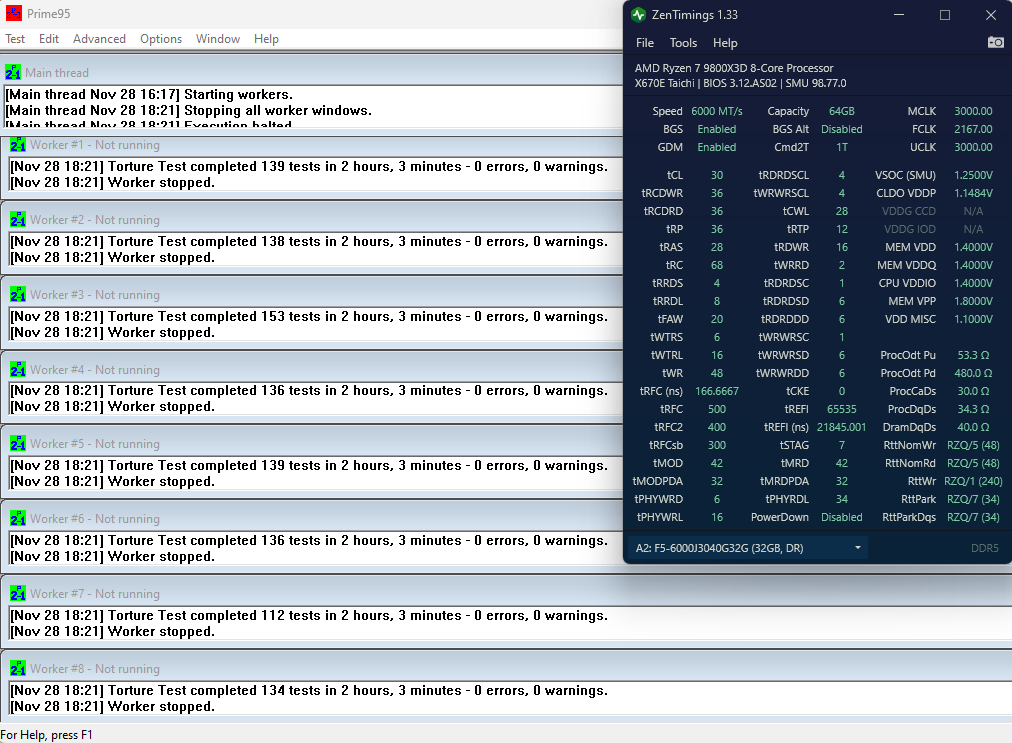
OK got my 2nd 9800X3D rig dialed in the same as the first (same memory kit, same CPU, different board - X670E Taichi for this one versus X670E Steel Legend for the last - also much better cooling with a 280MM Arctic Liquid Freezer III).

Platinum OCCT certification - https://www.ocbase.com/stabilityCertificate/674839ed8f4c643478234ba5

9800x3d_64gb_buildzoid_tweaked8.png


Karhu (9+ hours - was off at Thanksgiving or it would have been shorter, haha)

karhu_11282024.png


Prime95 Large FFTs (2 hours)

prime95_11282024.png
 
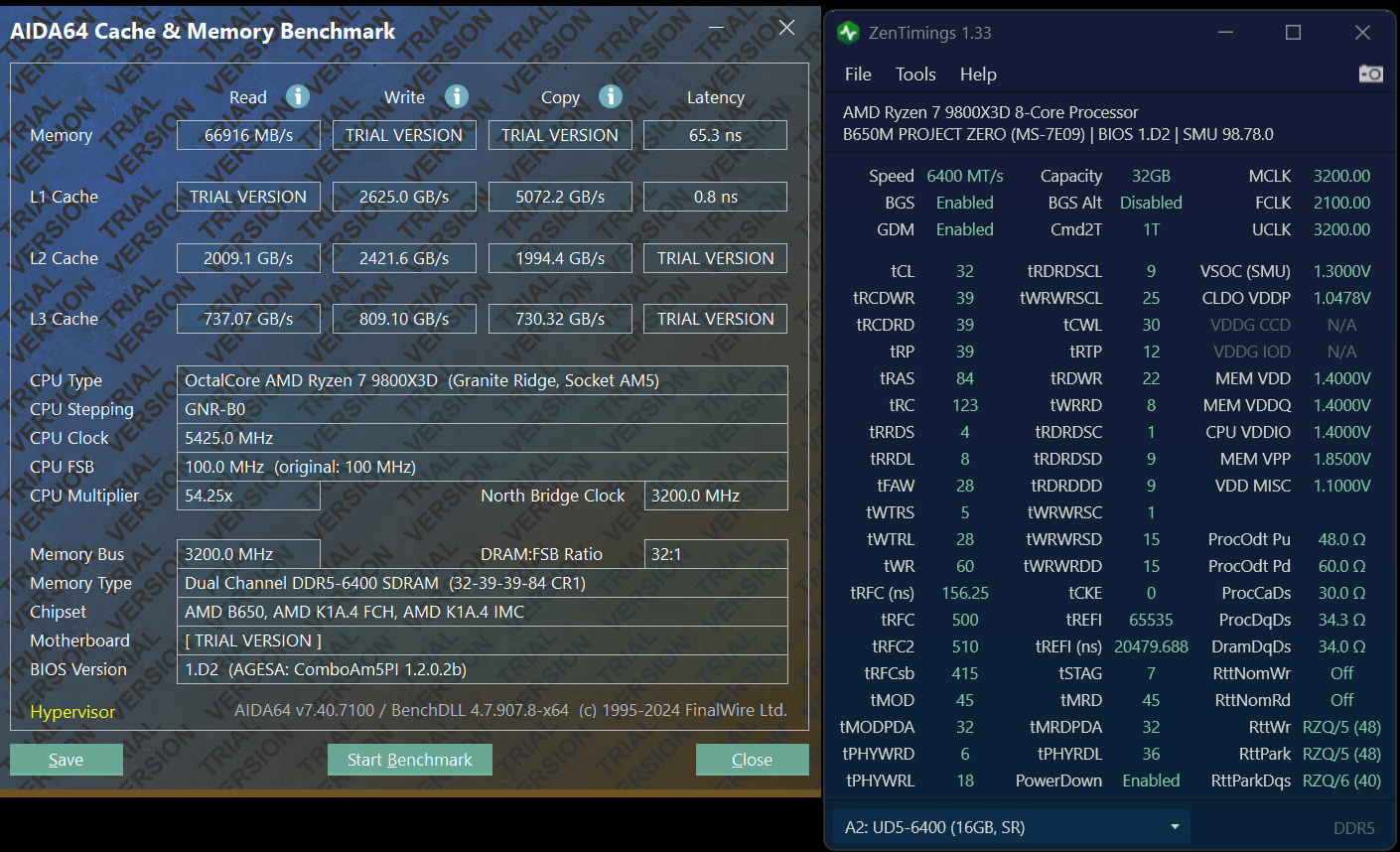
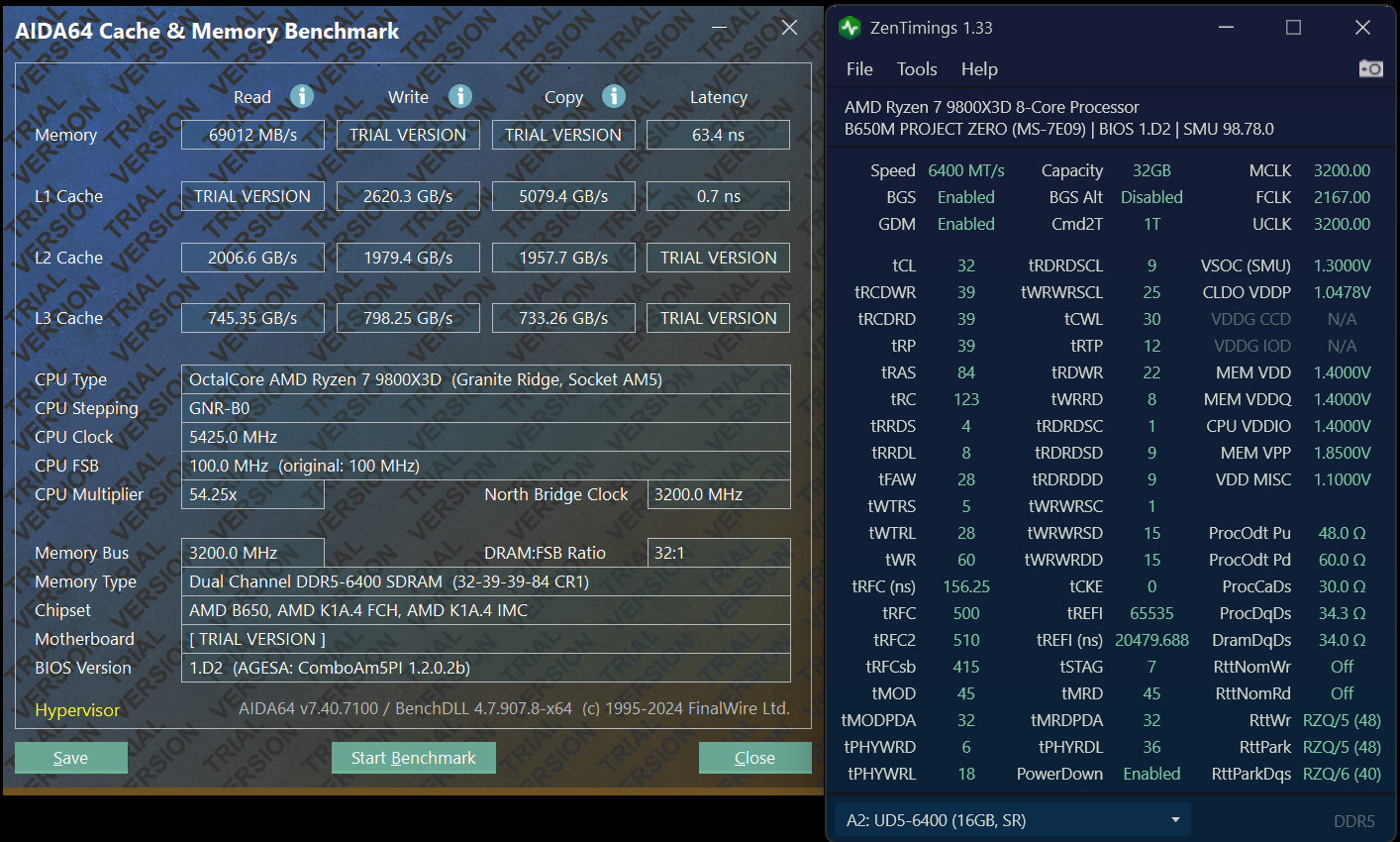
So, adding my timings with my 9800x3d. I decided to use the new MSI memory timings set to tightest. Wish I could use adjust the eclk, but can't with this motherboard. Gotta say this is a damn good CPU.

1732994724717.png
 
So, adding my timings with my 9800x3d. I decided to use the new MSI memory timings set to tightest. Wish I could use adjust the eclk, but can't with this motherboard. Gotta say this is a damn good CPU.

View attachment 694938
Awesome results! Did you try to push FCLK up at all? You should be able to hit 2167 MHz. I had a ton of problems trying to get to 2200 MHz.
 
Awesome results! Did you try to push FCLK up at all? You should be able to hit 2167 MHz. I had a ton of problems trying to get to 2200 MHz.
yeah I did try 2200 and it was a no go. Once I hit 2100 and saw these results, I was like...ok im good! lol.

I can give it a shot and see how it goes.
 
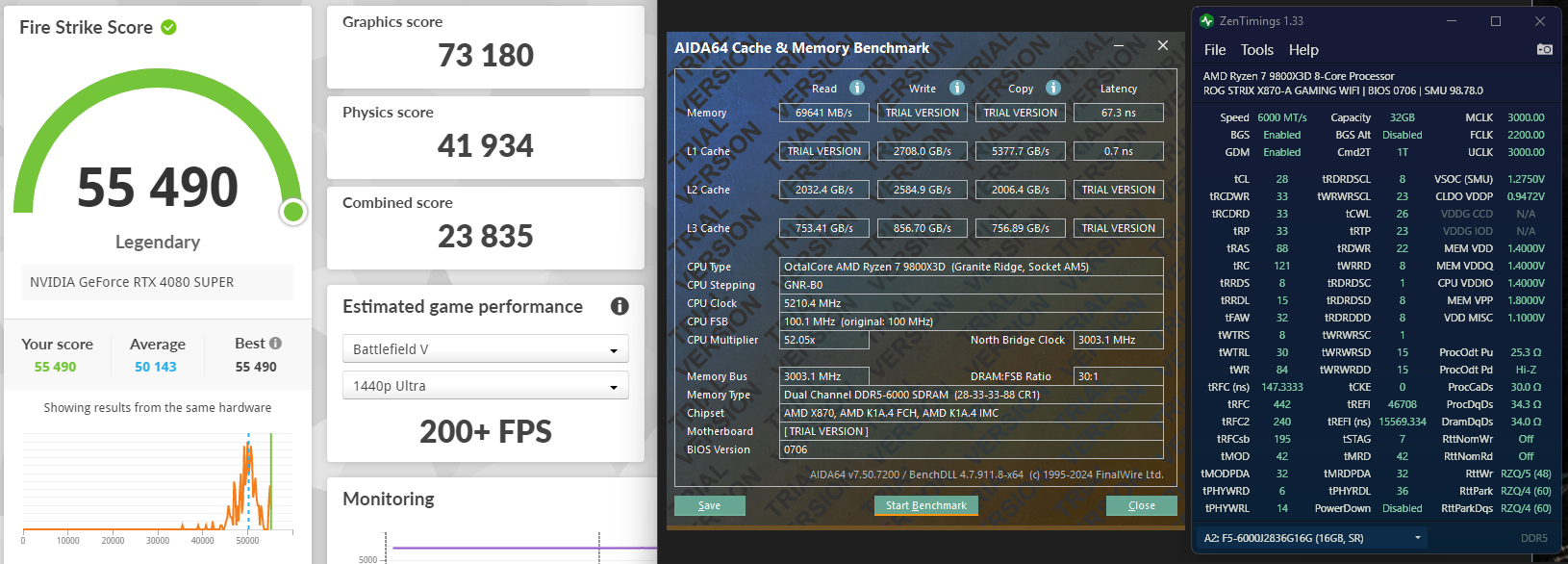
Here are my results for my 9800X3D. I have a couple insights to add about timings as well.

Screenshot 2024-12-18 084740.png


tRFC, tRFC2 and tRFCsb should all follow the same proportions as their stock timings. They are like gears in a vehicle or a watch, and always follow the same ratio. So if you want your tRFC values to be 10% faster, then multiply tRFC by 0.9, tRFC2 by 0.9 and tRFCsb by 0.9, the point is that they need to remain aligned. I subtracted 30 from the tRFCsb (think of it as minimum tRFC) with each step and then multiplied that number by the stock ratios, so I had 195, 195 x 1.230767 = 240 and 195 x 2.26667 = 442.

tREFI should be no higher than 4X the stock timing, anything higher than that is a waste and can create instability.
 
Last edited:
How is your memory latency so good? And how did you get tRp and tras so low??? My trp is unstable at 94 cycles at 1.41 volts, 6200MT/s, G.skill flarex 6000mt/s C36-36-36-96. My latency is 85ns, FCLK 2200MHz. With stock EXPO settings the FCLK2200 is 100% stable in P95 large FFTs, tested for 2 hours, 2 minutes per iteration.
 
Back
Top